Hadoop, Airflow, Spark, Kafka
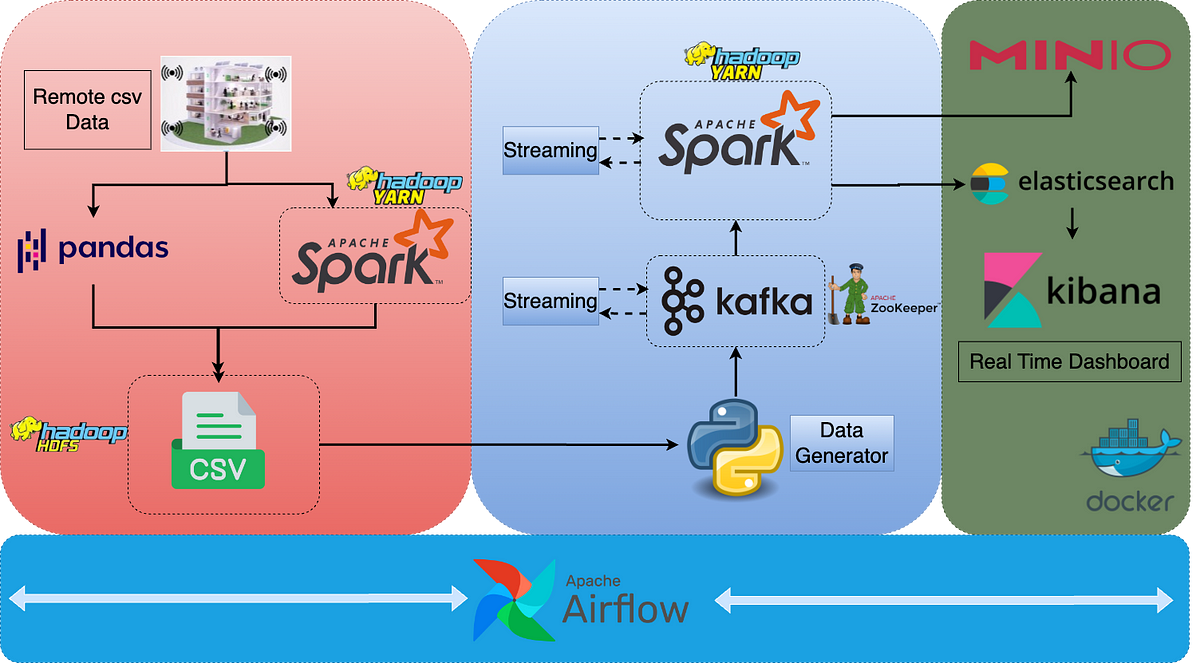
Behind the scenes, companies track and analyze customer interactions to improve recommendations, optimize user experience, and ultimately, boost sales. The backbone of this system are these five:
-
Apache Kafka
-
Apache Hadoop
-
Apache Spark
-
Apache Airflow
-
Elasticsearch
Let's see how they work together in a typical customer behavior analytics system.
Capturing Customer Data with Kafka
Every action a customer takes—clicking a product, searching for an item, abandoning a cart—is an event. To process millions of these events in real time, you need Kafka.
What Kafka does: Acts as a high-speed message broker, capturing real-time events and streaming them to other systems.
For example, on an e-commerce site, Kafka ingests:
-
Product views
-
Add-to-cart actions
-
Search queries
-
Purchase transactions
Kafka doesn’t store the data forever—it just ensures it moves quickly and reliably to where it needs to go.
Producing events to Kafka using Python:
from kafka import KafkaProducer
import json

producer = KafkaProducer(
    bootstrap_servers='localhost:9092',
    value_serializer=lambda v: json.dumps(v).encode('utf-8')
)

producer.send('customer_events', {'user_id': 123, 'event': 'add_to_cart', 'product_id': 456})
producer.flush()
Storing and Organizing the Data with Hadoop
Kafka streams events at high speed, but storing massive amounts of structured and unstructured data requires Hadoop.
What Hadoop does: Provides scalable, distributed storage (HDFS) for raw logs and transactional data.
Example: Your e-commerce platform might store:
-
Raw event logs for analysis
-
Purchase history for customer insights
-
Product catalog changes
Writing data to HDFS using Python:
from hdfs import InsecureClient

client = InsecureClient('http://thehadoopserver:50070', user='hadoop')
with client.write('/user/data/events.json', encoding='utf-8') as writer:
    writer.write('{"user_id": 123, "event": "purchase", "product_id": 456}')
Processing the Data with Spark
Now that we have a lake of raw data, we need to make sense of it. That’s where Apache Spark comes in.
What Spark does: Processes massive datasets fast using parallel computing. It can handle:
-
Batch processing (e.g., analyzing last month’s sales trends)
-
Real-time analytics (e.g., detecting drop-offs in checkout)
-
Machine learning (e.g., recommending products based on past purchases)
Example:
-
Spark clusters customers into segments (e.g., frequent buyers vs. one-time visitors).
-
Spark detects that users from a specific city buy more sneakers on Fridays.
-
Spark generates personalized product recommendations.
Using PySpark to process customer events:
from pyspark.sql import SparkSession

spark = SparkSession.builder.appName("CustomerAnalytics").getOrCreate()
data = spark.read.json("hdfs://thesparkserver:9000/user/data/events.json")
data.createOrReplaceTempView("events")

result = spark.sql("SELECT user_id, COUNT(*) as event_count FROM events GROUP BY user_id")
result.show()
Searching and Analyzing Data with Elasticsearch
Once data is processed, users need to search and retrieve insights in real-time—this is where Elasticsearch comes in.
What Elasticsearch does: Provides lightning-fast search capabilities and enables powerful analytics.
Example:
-
Customer service teams search for past purchases instantly.
-
Marketing teams analyze trends in search queries.
-
Product managers track product performance over time.
Indexing data into Elasticsearch:
from elasticsearch import Elasticsearch

es = Elasticsearch("http://theelasticsearch:9200")

document = {
    "user_id": 123,
    "event": "purchase",
    "product_id": 456
}

es.index(index="customer_events", document=document)
Automating Everything with Airflow
You don’t want engineers manually running scripts every day to process data. Airflow steps in to automate the entire pipeline.
What Airflow does: Schedules and orchestrates workflows, ensuring each step runs in the right order.
Example Workflow:
-
Kafka ingests customer actions.
-
Hadoop stores the raw logs.
-
Spark processes the data nightly.
-
Elasticsearch indexes processed insights for fast search.
-
Airflow ensures everything runs on schedule and alerts engineers if something fails.
Airflow DAG to automate Spark processing:
from airflow import DAG
from airflow.operators.bash import BashOperator
from datetime import datetime

default_args = {
    'owner': 'airflow',
    'start_date': datetime(2024, 1, 1),
    'retries': 1
}

dag = DAG('customer_behavior_pipeline', default_args=default_args, schedule_interval='@daily')

spark_task = BashOperator(
    task_id='run_spark_job',
    bash_command='spark-submit --master local process_data.py',
    dag=dag
)
The Final Output: A Customer Behavior Dashboard
After all this processing and automation, we get a real-time analytics dashboard that decision-makers can use to:
-
Track most-clicked products
-
Identify abandoned cart trends
-
Predict customer churn
-
Optimize the purchase funnel
Why This Architecture Works So Well
-
Scalable: Can handle millions of users without slowing down.
-
Real-time + Batch: Kafka handles real-time events, while Hadoop/Spark process historical data.
-
Fast Search & Analytics: Elasticsearch enables rapid querying of processed data.
-
Automated: Airflow ensures workflows run without manual intervention.
-
Cost-Effective: Open-source tools keep infrastructure costs manageable.